Create E-Learning Content with Adobe Captivate

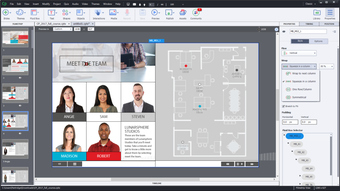
Adobe Captivate is a tool desiged for authorising a wide range of E-learning content. From demonstrations and simulations of software to entire E-learning courses, Adobe Captivate has it covered.

Top Recommended Alternative

A Comprehensive Solution for E-Learning

E-learning is a vital part of contemporary work, where organisations tend to favour giving employees opportunities to learn as they work. This is where Adobe Captivate comes in: it can be used to create content that makes the learning process easier for everyone involved. The tool can be used to create demonstrations, presentations, self-contained courses and more, based on whatever subject is appropriate.

A Multitude of Ways to Create E-Learning Content

Adobe Captivate comes with an extensive library of assets that can be used to built E-learning content, and adapted to suit the relevant topic. The tool can also be used to convert PowerPoint presentations into sophisticated E-learning content. In addition to all of this, Captivate includes localisation features that recognise the value of international co-productions in this day and age. While Adobe Captivate will take time for new users to learn, the interface has been heavily reworked since earlier releases to make the process more intuitive for newcomers.

  • Pros

    • A comprehensive range of tools for E-learning content.
    • The interface has been greatly improved since earlier versions.
  • Cons

    • The application's learning curve is steep
    • Unsuited to network drives; designed more for individual use.
 0/4

App specs

  • License

    Trial version

  • Version

    2

  • Latest update

  • Platform

    Windows

  • OS

    Windows 8.1

  • Language

    German

  • Downloads

    48.5K

    Last month's downloads

    • 5
  • Size

    91.34 MB

  • Developer

Program available in other languages


Icon of program: Adobe Captivate

Adobe Captivate for PC

  • Trial version
  • 2.8
    46
  • 48.5K
  • V2

User reviews about Adobe Captivate

Have you tried Adobe Captivate? Be the first to leave your opinion!

Add review

You may also like

Alternatives to Adobe Captivate

Explore Apps

Latest articles

Laws concerning the use of this software vary from country to country. We do not encourage or condone the use of this program if it is in violation of these laws.
Softonic

Is Adobe Captivate safe?

Score result: Clean

This file passed a comprehensive security scan using VirusTotal technology. It is safe to download.

  • Virus free
  • Spyware free
  • Malware free
  • Verified by Security Partners

    VirusTotal logo

Scan Info

Last scan
Wednesday, December 2, 2020
Scan provider
VirusTotal

Softonic security commitment

Adobe Captivate has been thoroughly scanned by our advanced security systems and verified by industry-leading partners. This file comes from the official developer and has passed all our security checks, showing no signs of viruses, malware, or spyware. For more information, visit our Security and Trust Center